
What is an Asphalt Calculator?
An asphalt calculator is a tool that estimates how much asphalt material you'll need for a paving project. That's really it.
You punch in your area dimensions—length, width, thickness. The calculator does the math. Gives you a number in tons or cubic yards. Some calculators also spit out a cost estimate if you enter a price per ton.
Why does this matter? Because asphalt isn't cheap. And guessing wrong in either direction costs you.
Order too little and your project stops. You wait for another delivery. Sometimes prices are higher for rush orders. Your crew stands around. The existing asphalt might cool too much before you can finish.
Order too much and you've got leftover material you paid for and can't return. Most suppliers won't take it back once it's on your site.
Accurate calculations mean you buy what you need. Not more. Not less. Budget stays on track. Project runs smooth.
How Does an Asphalt Calculator Work?
The math behind it is honestly pretty simple. But nobody wants to do it by hand.
Here's what the calculator needs from you:
- Length of the area (feet or meters)
- Width of the area (feet or meters)
- Thickness or depth of asphalt (usually in inches)
You pick your measurement units. The calculator converts everything and runs the formula.
It multiplies length times width to get square footage. Then factors in thickness to get volume—cubic feet or cubic yards. Then it converts volume to weight using asphalt density values. Because you buy asphalt by weight, not volume.
The output? Usually tons needed. Sometimes cubic yards. Some calculators show both.
Better calculators account for compaction too. Asphalt compacts when you roll it. So the loose material you pour is thicker than the finished layer. The good calculators factor that in automatically.
How to Use an Asphalt Calculator
Using one of these is straightforward. But there are some spots where people trip up.
Here's the process:
- Measure your project area—length and width
- Decide how thick the asphalt needs to be
- Pick your measurement units in the calculator
- Enter your dimensions
- Check the results
- Add a waste factor (5-10% extra is smart)
- Multiply by local price per ton for cost estimate
Tips for getting it right: Measure twice. Write it down. Don't round up too aggressively on every measurement—the errors compound.
Step 1: Measure Your Project Area
Rectangular areas are easy. Measure the length. Measure the width. Done.
But most driveways aren't perfect rectangles, right? They curve. They widen at the garage. They have weird angles.
For irregular shapes, break it into sections. Measure each section separately. Add them up at the end. A curved driveway might be three rectangles when you divide it up.
For circles or curves, you'll need different formulas. Or just approximate with rectangles and add some extra.
Tools you'll want:
- Measuring tape for smaller areas
- Measuring wheel for driveways and parking lots
- Stakes and string for marking boundaries
Pro tip: measure in feet. Most calculators expect feet. Converting from yards or meters adds another chance for error.
Step 2: Determine Asphalt Thickness
Thickness depends on what you're paving and how much traffic it'll see.
Standard thickness guidelines:
- Residential driveways: 2-3 inches
- Commercial driveways: 3-4 inches
- Parking lots: 4-6 inches
- Roads and highways: 6+ inches
But these are starting points. Not rules.
Your actual thickness depends on a few things. Expected traffic load matters most. A driveway with two sedans is different from one where you park a dump truck.
Soil conditions matter too. Soft or clay-heavy soil needs thicker base layers. Sometimes thicker asphalt too.
Climate plays a role. Freeze-thaw cycles stress pavement. Hotter climates cause different issues. Local contractors know what works in your area.
When in doubt, go thicker. It costs more upfront but lasts longer. Thin asphalt over a weak base cracks fast.
Step 3: Enter Measurements and Calculate
Okay so you've got your numbers. Now put them in.
Select the right units first. Feet and inches is most common in the US. Meters elsewhere. Mixing units is the fastest way to get a garbage result.
Enter length. Enter width. Enter thickness.
Hit calculate.
The output shows tonnage. That's what you order from the supplier.
Some calculators show cubic yards too. Useful for comparing quotes—some suppliers price by yard, some by ton.
One cubic yard of compacted asphalt weighs about 2 tons. So if your result seems way off from what you expected, check if you're looking at yards versus tons.
Asphalt Calculation Formula
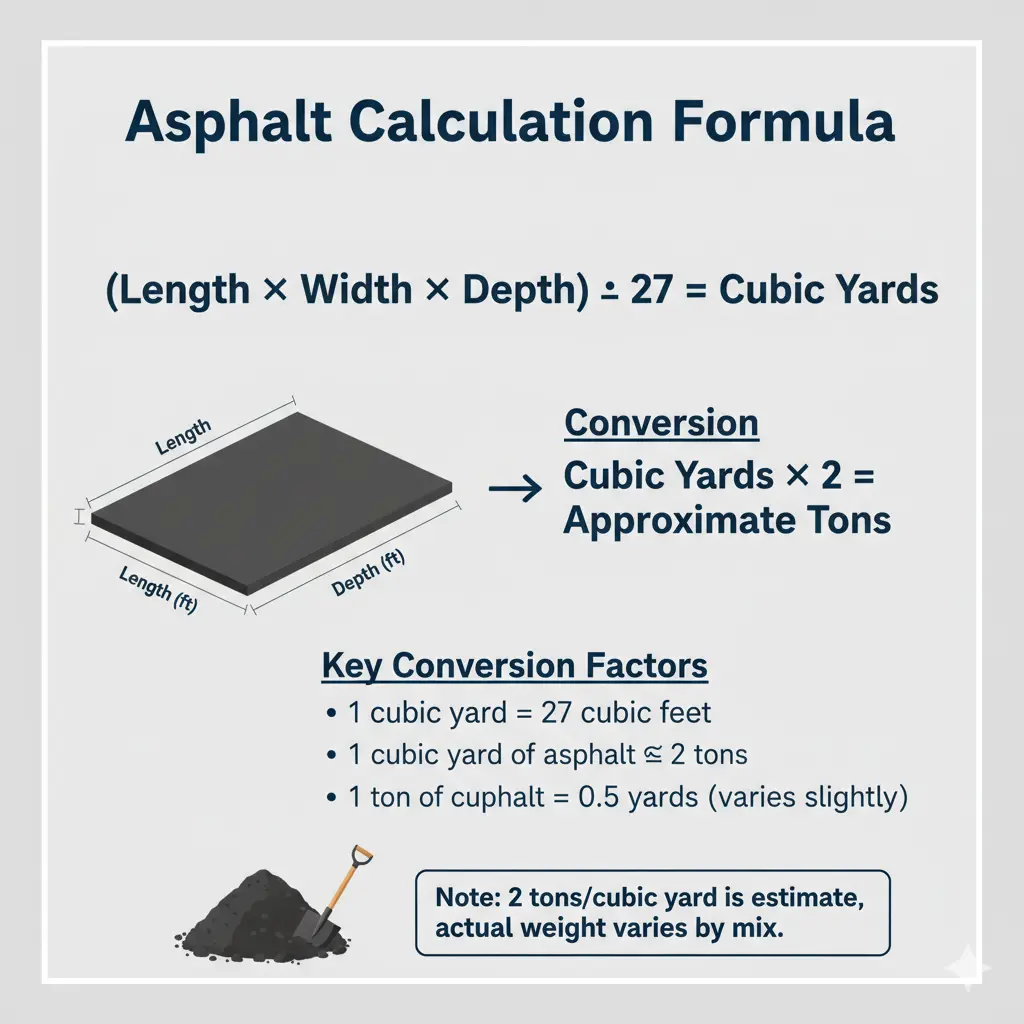
Want to do the math yourself? Here's the formula:
Formula
(Length × Width × Depth) ÷ 27 = Cubic YardsThen:
Conversion
Cubic Yards × 2 = Approximate TonsThe divide-by-27 converts cubic feet to cubic yards. Because there are 27 cubic feet in one cubic yard.
The multiply-by-2 converts yards to tons. Because one cubic yard of hot mix asphalt weighs roughly 2 tons. Actually it's closer to 1.8-2.2 depending on the mix, but 2 works for estimating.
Some conversion factors to know:
- 1 cubic yard = 27 cubic feet
- 1 cubic yard of asphalt ≈ 2 tons
- 1 ton of asphalt ≈ 0.5 cubic yards (varies slightly)
Let me show you an example.
Say you're paving a driveway that's 40 feet long, 12 feet wide, and you want 3 inches of asphalt.
Worked example
- First convert thickness to feet: 3 inches = 0.25 feet
- Volume: 40 × 12 × 0.25 = 120 cubic feet
- Cubic yards: 120 ÷ 27 = 4.44 cubic yards
- Tons: 4.44 × 2 = 8.88 tons
So you'd order about 9 tons. Maybe 10 to have a small buffer.
How many square feet does a ton of asphalt cover?
This depends entirely on thickness.
- At 2 inches thick, one ton covers about 80-85 square feet.
- At 3 inches thick, one ton covers about 55-60 square feet.
- At 4 inches thick, one ton covers about 40-45 square feet.
See the pattern? Thicker asphalt means less coverage per ton. Makes sense when you think about it. Same weight spread thinner goes further.
Quick estimate
500 ÷ 80 = 6.25 tons (approx.)Not exact. But gets you in the ballpark fast.
How do I calculate tons of asphalt needed?
Here's the quick version:
- Calculate area in square feet (length × width)
- Multiply by depth in feet
- Divide by 27 to get cubic yards
- Multiply by 2 to get tons
Or use this shortcut:
Shortcut
Square Feet × Depth in Inches × 0.00617 = TonsThat factor (0.00617) combines all the conversions into one number. Works well for rough estimates.
Shortcut example
500 × 2 × 0.00617 = 6.17 tonsClose to what we got before. The small difference comes from rounding in the density assumption.
Either method works. Use whichever makes more sense to you. Or just use a calculator and let it handle the math.